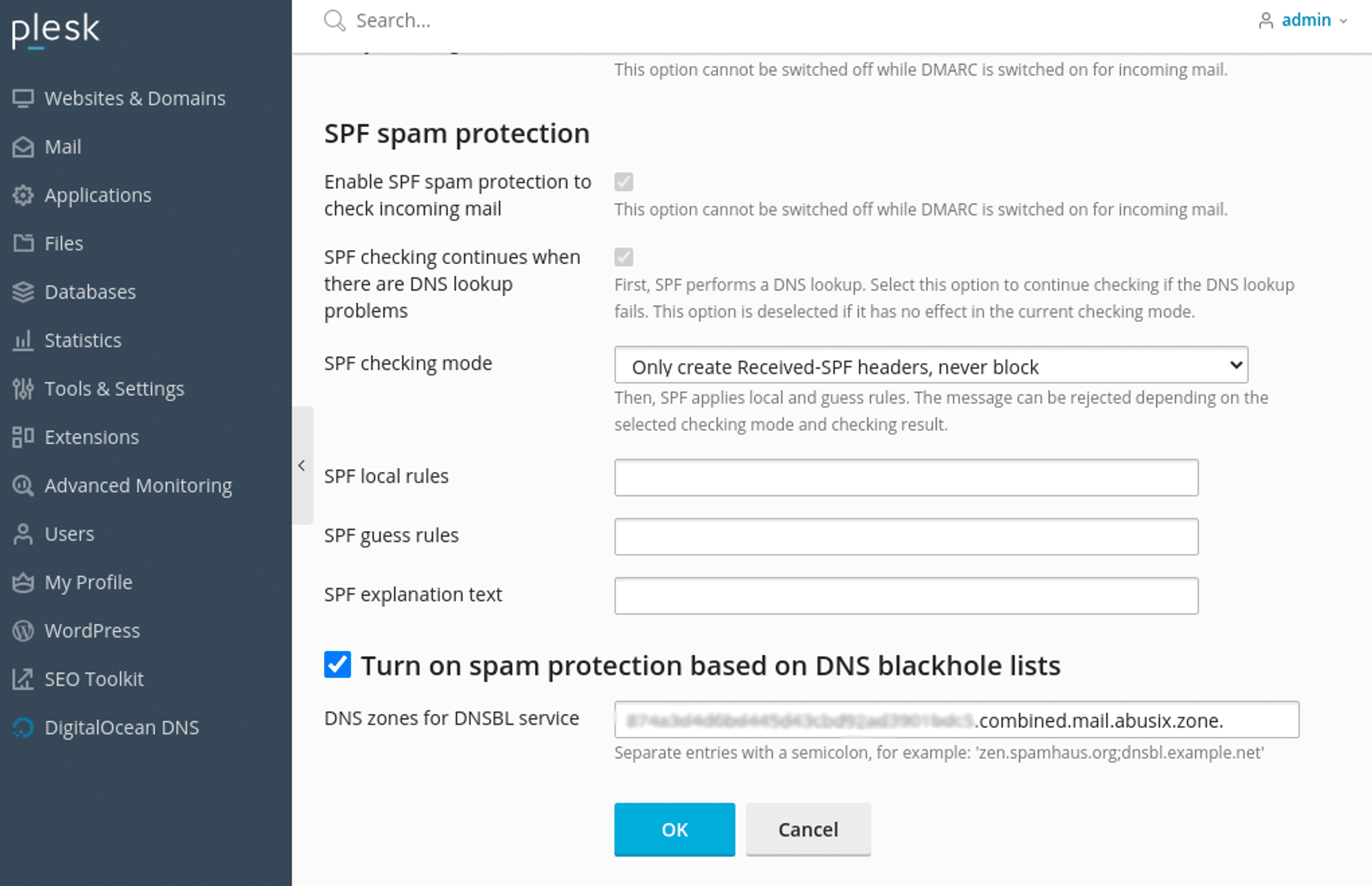
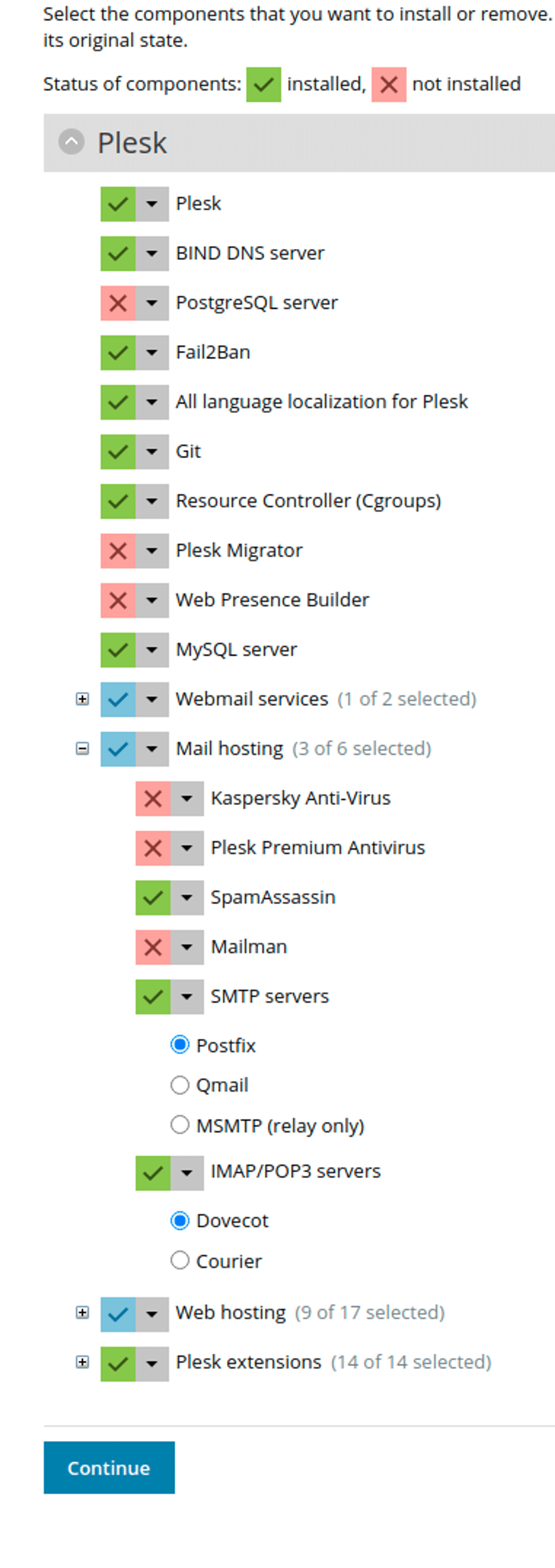
To add Guardian Mail:In the Plesk console, go to “Tools & Settings” and “Mail Server Settings” under the “Mail” heading.Scroll to the bottom of the page and enable the option “Turn on spam protection based on DNS blackhole lists,” then set “DNS zones for DNSBL service” to:<APIKEY>.combined.mail.abusix.zoneReplace <APIKEY> with “Your API key” from your account in app.abusix.com.Then click ‘OK.’SpamAssassin can also be installed on Plesk, allowing Guardian Mail to provide additional filtering.This can be installed by going to “Tools & Settings,” “Plesk,” “Updates,” “Add/Remove Components”, expanding “Mail Hosting” by clicking the + next to it, selecting “Install” under “SpamAssassin” and click “Continue.”Once SpamAssassin is installed, you can use the following instructions to configure it to use Guardian Mail. You will need to use SSH and edit the necessary files by hand, as Plesk does not provide a way to do this via the console.InstructionsEdit local.cf_ _(usually found in /etc/mail/spamassassin) as follows.
ifplugin Mail::SpamAssassin::Plugin::DNSEval header __RCVD_IN_AMI eval:check_rbl('ami', '<APIKEY>.combined.mail.abusix.zone.') describe __RCVD_IN_AMI Received via a relay in Guardian Mail tflags __RCVD_IN_AMI net header RCVD_IN_AMI_BLACK eval:check_rbl_sub('ami', '^127\.0\.0\.(?:[23]|200)$') describe RCVD_IN_AMI_BLACK Received via a relay in Guardian Mail Black score RCVD_IN_AMI_BLACK 3.0 tflags RCVD_IN_AMI_BLACK net header RCVD_IN_AMI_EXPLOIT eval:check_rbl_sub('ami', '127.0.0.4') describe RCVD_IN_AMI_EXPLOIT Received via a relay in Guardian Mail Exploit score RCVD_IN_AMI_EXPLOIT 3.0 tflags RCVD_IN_AMI_EXPLOIT net header RCVD_IN_AMI_DYN eval:check_rbl('ami-lastexternal', '<APIKEY>.combined.mail.abusix.zone.', '^127\.0\.0\.1[12]$') describe RCVD_IN_AMI_DYN Received via a relay in Guardian Mail Dynamic score RCVD_IN_AMI_DYN 3.0 tflags RCVD_IN_AMI_DYN net header RCVD_IN_AMI_WHITE eval:check_rbl('ami-firsttrusted', '<APIKEY>.combined.mail.abusix.zone.', '127.0.2.1') describe RCVD_IN_AMI_WHITE Received via a relay in Guardian Mail White score RCVD_IN_AMI_WHITE -0.1 tflags RCVD_IN_AMI_WHITE nice netendififplugin Mail::SpamAssassin::Plugin::URIDNSBL urirhsbl URIBL_AMI_DBLACK <APIKEY>.dblack.mail.abusix.zone. A body URIBL_AMI_DBLACK eval:check_uridnsbl('URIBL_AMI_DBLACK') describe URIBL_AMI_DBLACK Contains a spam URL listed in the Guardian Mail domain blocklist score URIBL_AMI_DBLACK 3.0 tflags URIBL_AMI_DBLACK net urirhssub URIBL_AMI_WHITE <APIKEY>.white.mail.abusix.zone. A 127.0.2.1 body URIBL_AMI_WHITE eval:check_uridnsbl('URIBL_AMI_WHITE') describe URIBL_AMI_WHITE Contains a domain listed in the Guardian Mail domain whitelist score URIBL_AMI_WHITE -0.1 tflags URIBL_AMI_WHITE nice netendif
Replace <APIKEY> in all places with “Your API key” from your account in app.abusix.com.Then restart SpamAssassin.Once you have made these changes, run “systemctl restart spamassassin” to restart it.
Assistant
Responses are generated using AI and may contain mistakes.