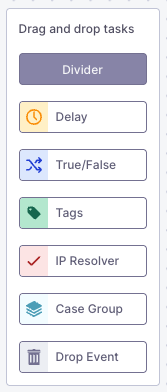
The following nodes are available for building your inbound processing flow:
* **Delay** - Add time delays in processing
* **True/False** - Conditional logic branching
* **Tags** - Apply tags to events
* **[Resolution](/docs/guardian-ops/customer-resolution)** - Customer resolution logic
* **Case Group** - Group events into cases
* **Drop Event** - Remove events your abuse desk ignores
* **Divider** - to document and comment within complex workflows
For detailed information about each node, see the [Node Reference](/docs/guardian-ops/node-reference).
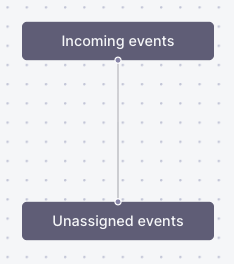 See the [Unassigned Events](#unassigned-events) section below for more details on unassigned events.
## Flow States
Inbound processing flows have different operational states that determine if events are handled and whether a flow can be modified. Only one inbound processing flow version can be active at a time.
For detailed information about flow states (Draft, Active, and Draining), see the [Flow States reference](/docs/guardian-ops/reference/flow-states).
## Activating a Flow
To activate your inbound processing flow, complete your configuration in draft mode, save your draft, and click the **Activate** button. When you activate a new flow, the previous flow (if any) enters the draining state to ensure no events are lost during the transition.
For detailed activation instructions and best practices, see [Flow States](/docs/guardian-ops/reference/flow-states#activating-flows).
## Unassigned Events
All events that don't match your filters and rules in inbound processing end up in the **unassigned section**. This section contains events that caused **processing errors**, remain **unresolved** after processing, or **don't match any branches that end up in a case group** in your inbound processing flow.
### Common Causes
**Unresolved events** typically occur when your resolver API returns an error or when no matching customer is found in your database. If you only have an IP resolver configured, it may happen that Guardian Ops cannot resolve a domain to an IP address in a domain-related abuse event, which means no customer ID is present and therefore the event is considered unresolved.
### Managing Unassigned Events
You can handle unassigned events in two ways. The recommended approach is to update your inbound processing flow by incorporating these events into your rule set. Alternatively, you can explicitly drop events that should not be processed using drop nodes in your flow.
To keep things tidy, you can delete unassigned events.
View the unassigned events section in [Guardian Ops](https://app.abusix.com/guardian/ops/settings/inbound-processing/unresolved-and-error-events).
## Examples
See the [Unassigned Events](#unassigned-events) section below for more details on unassigned events.
## Flow States
Inbound processing flows have different operational states that determine if events are handled and whether a flow can be modified. Only one inbound processing flow version can be active at a time.
For detailed information about flow states (Draft, Active, and Draining), see the [Flow States reference](/docs/guardian-ops/reference/flow-states).
## Activating a Flow
To activate your inbound processing flow, complete your configuration in draft mode, save your draft, and click the **Activate** button. When you activate a new flow, the previous flow (if any) enters the draining state to ensure no events are lost during the transition.
For detailed activation instructions and best practices, see [Flow States](/docs/guardian-ops/reference/flow-states#activating-flows).
## Unassigned Events
All events that don't match your filters and rules in inbound processing end up in the **unassigned section**. This section contains events that caused **processing errors**, remain **unresolved** after processing, or **don't match any branches that end up in a case group** in your inbound processing flow.
### Common Causes
**Unresolved events** typically occur when your resolver API returns an error or when no matching customer is found in your database. If you only have an IP resolver configured, it may happen that Guardian Ops cannot resolve a domain to an IP address in a domain-related abuse event, which means no customer ID is present and therefore the event is considered unresolved.
### Managing Unassigned Events
You can handle unassigned events in two ways. The recommended approach is to update your inbound processing flow by incorporating these events into your rule set. Alternatively, you can explicitly drop events that should not be processed using drop nodes in your flow.
To keep things tidy, you can delete unassigned events.
View the unassigned events section in [Guardian Ops](https://app.abusix.com/guardian/ops/settings/inbound-processing/unresolved-and-error-events).
## Examples
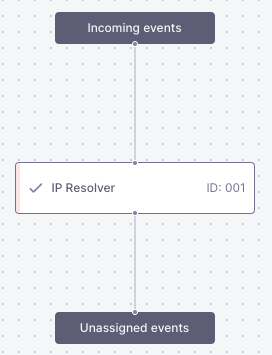 This basic example shows events entering through the incoming events node, being processed by an IP resolver to identify customers (assign abusive IP as customer ID).
This will only populate the [customers view](https://app.abusix.com/guardian/ops/customers) as no case groups are configured in the flow.
This basic example shows events entering through the incoming events node, being processed by an IP resolver to identify customers (assign abusive IP as customer ID).
This will only populate the [customers view](https://app.abusix.com/guardian/ops/customers) as no case groups are configured in the flow.
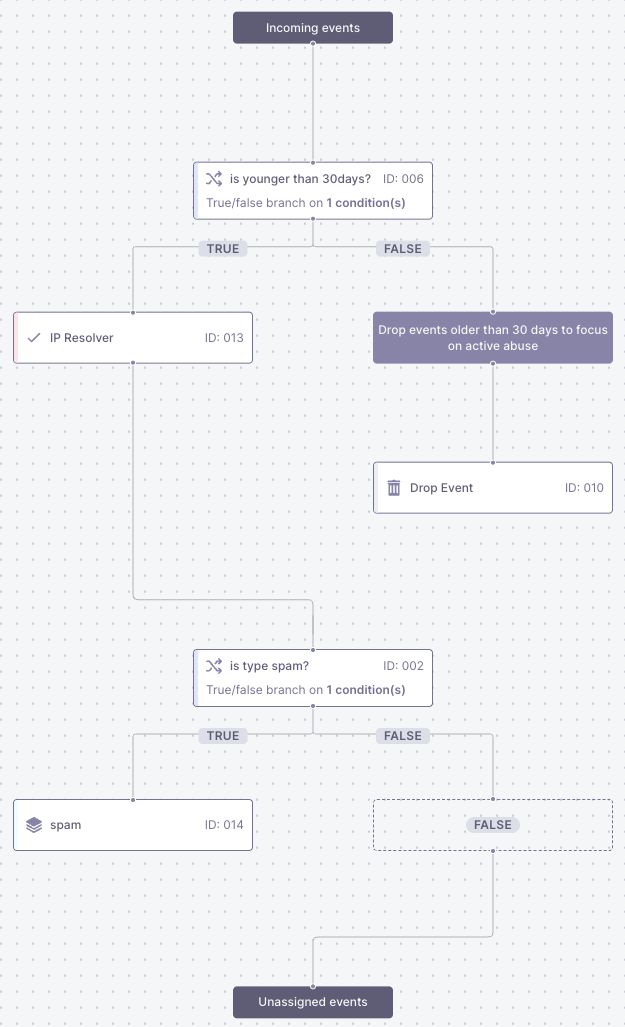 This flow uses a True/False node to check if the event type equals **spam**. You can configure the conditional logic by setting rules in the node configuration:
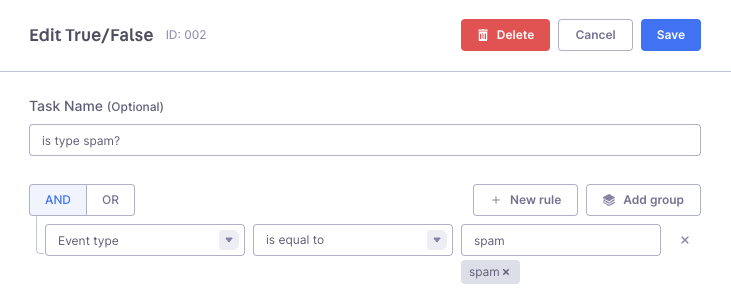 Events matching the condition (event type equals spam) follow the **true path** to the **spam case group**, while other events follow the **false path** and can be routed to different case groups, dropped entirely, or go to the unassigned section where you can analyze what other types of events you want to incorporate in your flow.
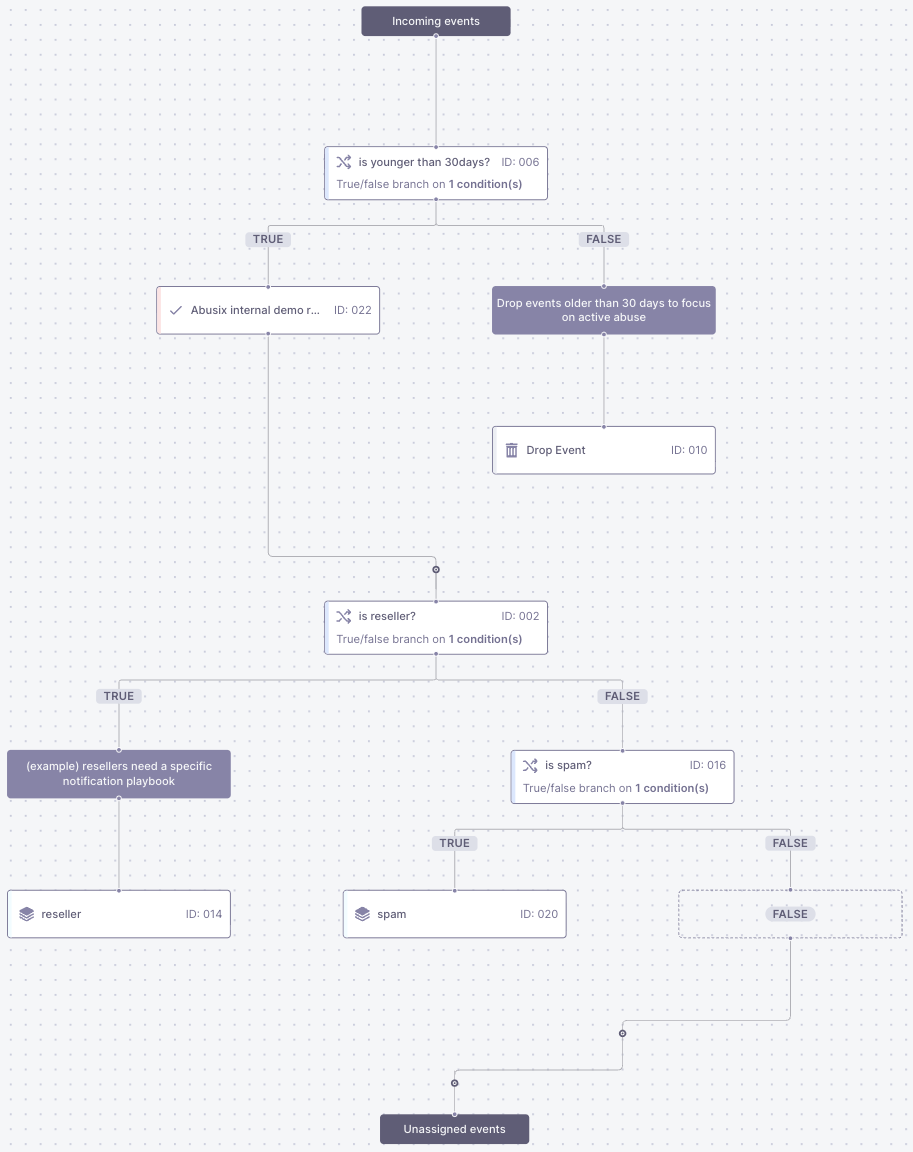 **Reseller Customer Handling**\
The flow includes a dedicated path for reseller customers, allowing you to notify them directly when abuse occurs in their network instead of handling it internally.
The information that a customer is a reseller comes from the API resolver, which gets this information from your API.
**Event Age Filtering**\
Events are checked to ensure they are younger than 30 days. This prevents old abuse events that are no longer relevant from cluttering your abuse desk.
**Standard Processing for Non-Resellers**\
For non-reseller customers, the setup follows the same logic as the conditional flow:
* Events with type "spam" create cases in the spam case group
* All other events go to the unassigned section for analysis
### Configuration
You can configure the conditional logic and API resolver settings in the node configuration:
**Reseller Customer Handling**\
The flow includes a dedicated path for reseller customers, allowing you to notify them directly when abuse occurs in their network instead of handling it internally.
The information that a customer is a reseller comes from the API resolver, which gets this information from your API.
**Event Age Filtering**\
Events are checked to ensure they are younger than 30 days. This prevents old abuse events that are no longer relevant from cluttering your abuse desk.
**Standard Processing for Non-Resellers**\
For non-reseller customers, the setup follows the same logic as the conditional flow:
* Events with type "spam" create cases in the spam case group
* All other events go to the unassigned section for analysis
### Configuration
You can configure the conditional logic and API resolver settings in the node configuration:
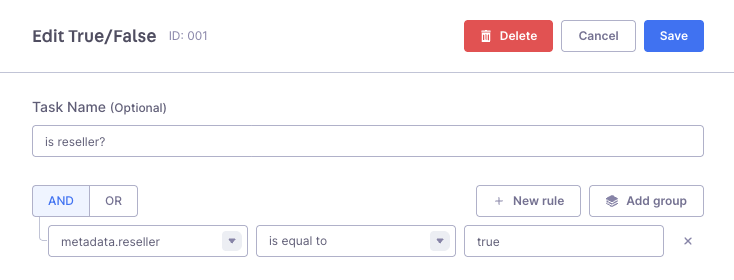 This example shows one of many approaches that Guardian Ops supports for handling different customer types while maintaining efficient processing for standard abuse cases.